
Will and Guy’s Collection of Funny Support Calls

We have collected the funniest calls to computer tech support departments at Dell BT and HP.
Actual Calls to Computer Technical Support Reps
Get the right computer – 1
Customer: I’m trying to connect to the Internet with your CD, but it just doesn’t work. What am I doing wrong?
Tech support: OK, You’ve got the CD in the CD drive, right?
Customer: Yeah….
Tech support: And what sort of computer are you using?
Customer: Computer? Oh no, I haven’t got a computer. It’s in the CD player and all I get is weird noises. Listen…..
Tech support: Aaaarrrrgggghhhh!!!
Get the right computer – 2
Tech support: What kind of computer do you have?
Female customer: A white one…
Change of Mind
Customer: I keep getting inappropriate pop-ups on my computer and don’t want my wife to think that it’s me.’
Advisor: ‘I will remove them for you.’
Customer: ‘How do I get them back when she is not in?’
Step 1…
Customer: Hi, this is Celine. I can’t get my diskette out.
Tech support: Have you tried pushing the button?
Customer: Yes, sure, it’s really stuck.
Tech support: That doesn’t sound good; I’ll make a note.
Customer: No .. wait a minute… I hadn’t inserted it into the computer yet… it’s still on my desk… sorry….
During a recent password audit, it was found that a blonde was using the following password:
“MickeyMinniePlutoHueyLouieDeweyDonaldGoofyParis”
When asked why she had such a long password, she said she was told that it had to be at least 8 characters long and include at least one capital.
Tech support: Are you sure you used the right password?
Customer: Yes, I’m sure. I saw my colleague do it.
Tech support: Can you tell me what the password was?
Customer: Five stars.
Touch and GoCustomer: I have a huge problem. A friend has placed a screen saver on my computer, but every time I move the mouse, it disappears.
Circular argumentTech support: How may I help you?
Customer: I’m writing my first e-mail.
Tech support: OK, and what seems to be the problem?
Customer: Well, I have the letter ‘a’ in the address, but how do I get the circle around it?
Local difficultyCustomer: My 14 year-old son has put a password on my computer and I can’t get in.
Advisor: Has he forgotten it?
Customer: No he just won’t tell me it because I’ve grounded him.
Language difficultyCustomer: ‘How do you spell ‘Internet America’? Is there a space between ‘inter’ and ‘net’ ?’
Tech Support: ‘No space between ‘inter’ and ‘net’. It’s spelled normally.’
Customer: ‘Ok. A-M-E-R-I-C-K?’ Tech Support: ‘That’s A-M-E-R-I-C-A.’ Customer: ‘I-C-K???’
Tech Support: ‘A as in apple’ Customer: ‘There’s no ‘K’ in apple!’
No commentCustomer: I met a man on the internet, can you give me his phone number?
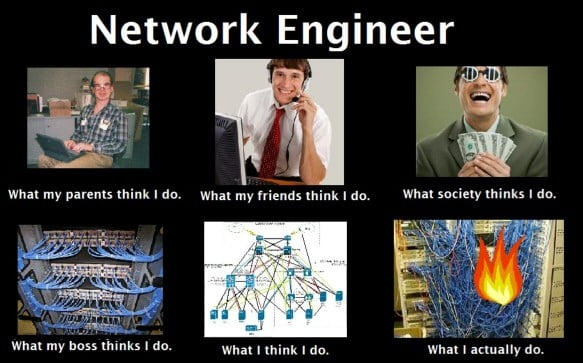
Customer Tech Support – Network Engineeer
Will and Guy’s – Tech Support Jokes
We have selected the best ten Tech Support Jokes. They were take by advisors at BT, HP and Dell.

1) Customer: ‘My disk ran out of space when trying to save my Word document, so I changed it from double spaced to single spaced and it still wouldn’t fit!’
2) Advisor: ‘Press any key to continue.
Customer: I can’t find the ‘Any’ key.
3) Great Vision
3a) Tech Support: ‘Ok, in the bottom left of the screen, can you see the ‘OK’ button displayed?’
Customer: ‘Wow. How can you see my screen from there?’
3b) Advisor: Can you click on ‘My Computer’?
Customer: I don’t have your computer, just mine.
3c) Advisor: You have Spyware on your machine which is causing the problem.
Customer: Spyware? Can they see me getting dressed through the monitor?
3d) Customer: My family in Australia use BT Softphone, I can see them but they can’t see me.
Advisor: What brand is your webcam?
Customer: What’s a webcam?
4) No Saving Grace
Customer: ‘All my files I saved last week to my C: drive are missing!’
Tech Support: ‘Do you remember what directory you first saved them in?’
Customer: ‘No, I don’t. I just know it was on my C: drive.’
Tech Support: ‘Ok, I’ll walk you through how to find the files.’
Customer: ‘I wouldn’t think I would be losing files on this computer. Gee, I just had the hard drive replaced in it yesterday.’

5) Tricky Install
Customer: ‘Do I need a computer to use your software?’
Tech Support: ‘Ok, I can help you install the software. Would you like me to do that?’
Customer: ‘Yes.’
Tech Support: ‘All right, can you insert the disk in the disk drive please?’
Customer: ‘How?’
Tech Support: ‘Place the disk in the opening at the front of the computer.’
Customer: ‘Will I have to have my computer delivered before we can do this’
Tech Support: ‘Um yes, that might be an idea.’
6) Customer: My iPod will only play one song.
Advisor: Which other tracks have you downloaded from iTunes?
Customer: Do I need to download tracks?
7) Tech Support: ‘Have you made backups of your software and data?’
Customer: ‘I didn’t know it had a reverse.’

8) Customer: How do I change channel on my monitor?
Advisor: Your monitor won’t have channels like a TV.
Customer: But I was watching the internet channel the other day and now I just get the word processing channel.
9) Customer: My mouse mat isn’t wired up.
Advisor: I’m not sure I understand, your mouse mat shouldn’t have any wires.
Customer: Well how does it know where my mouse is? Is it wireless?
Another Batch of Funny Support Calls
Give Microsoft a chance
Customer: ‘I’m having trouble installing Microsoft Word.’
Tech Support: ‘Tell me what You’ve done.’
Customer: ‘I typed A:SETUP.’
Tech Support: ‘Ma’am, remove the disk and tell me what it says.’
Customer: ‘It says [PC manufacturer] Restore and Recovery disk’.
Tech Support: ‘Insert the MS Word setup disk.’
Customer: ‘What?’
Tech Support: ‘Did you buy Microsoft Word?’
Customer: ‘No…’

Dial Tone
Tech Support: ‘Thank you for calling. May I have your phone number beginning with area code first, please?’ There was a pregnant pause, then a series of touch tones.
Tech Support: ‘Hello? I need your phone number, please’. More touch tones.
Tech Support: ‘Hi, can you hear me?’
Customer: ‘Yes.’
Tech Support: ‘Great, then can you please tell me your phone number so I can pull up your file?’ More touch tones.
Tech Support: ‘Sir, what’s your name?’
Customer: Malcolm
Tech Support: ‘Great, now can you tell me your phone number?’ Touch tones again.
Tech Support: ‘Please, tell me your phone number.’
Customer: ‘Again?’
Tech Support: ‘Yes sir, if you don’t mind, but can you please just tell me verbally?’ Touch tones yet again.
Tech Support: ‘Sir, contrary to popular opinion, support is not half machine. I’ll need you to verbally tell me your phone number with your mouth so I can bring up your account info, got it?’
Customer: ‘You people are rude as well as incompetent.’
Please send us your funny support call
Tech Support Calls that Make Will and Guy Laugh
Give Microsoft a chance
Customer: ‘I’m having trouble installing Microsoft Word.’
Tech Support: ‘Tell me what You’ve done.’
Customer: ‘I typed A:SETUP.’
Tech Support: ‘Ma’ am, remove the disk and tell me what it says.’
Customer: ‘It says [PC manufacturer] Restore and Recovery disk’.
Tech Support: ‘Insert the MS Word setup disk.’ Customer: ‘What?’
Tech Support: ‘Did you buy Microsoft Word?’
Customer: ‘No…’
Change of Mind
Customer: I keep getting inappropriate pop-ups on my computer and don’t want my wife to think that it’s me.’
Advisor: ‘I will remove them for you.’
Customer: ‘How do I get them back when she is not in?’
Dial Tone
Tech Support: ‘Thank you for calling. May I have your phone number beginning with area code first, please?’ There was a pregnant pause, then a series of touch tones.
Tech Support: ‘Hello? I need your phone number, please’. More touch tones.
Tech Support: ‘Hi, can you hear me?’ Customer: ‘Yes.’
Tech Support: ‘Great, then can you please tell me your phone number so I can pull up your file?’ More touch tones.
Tech Support: ‘Sir, what’s your name?’ Customer: Malcolm
Tech Support: ‘Great, now can you tell me your phone number?’ Touch tones again.
Tech Support: ‘Please, tell me your phone number.’ Customer: ‘Again?’
Tech Support: ‘Yes sir, if you don’t mind, but can you please just tell me verbally?’ Touch tones yet again.
Tech Support: ‘Sir, contrary to popular opinion, support is not half machine. I’ll need you to verbally tell me your phone number with your mouth so I can bring up your account info, got it?’ Customer: ‘You people are rude as well as incompetent.’
First Email
Tech support: How may I help you?
Customer: I’m writing my first e-mail.
Tech support: OK, and what seems to be the problem?
Customer: Well, I have the letter ‘a’ in the address, but how do I get the circle around it?
Tech Support Jokes
Tech Support Jokes
Will and Guy bring you the most bizarre tech support stories from computer, phone and related technical supprot help lines.
DECT* Phone Helpdesk
I got a call from Austria one day.
The caller said, “hello. My train doesn’t work.”
I said, “excuse me?”
“My model train. It’s stopped working.”
“This is the Helpdesk for telephones,” I said. “I think you’ve got the wrong number.”
“Oh no, it’s the right number. You see I’ve been using your phone as a remote control to move my trains round the tracks and it worked fine until yesterday!”
I had to answer him with a straight face. I said, “I’m sorry sir but we do not receive training in how to power model trains with DECT* phones so I’m afraid I can’t help you there.”
* DECT is brand of phone used in Europe. Thanks to Shelley Hall for this report.
Best Tech Support Jokes – As Reported by Advisors at BT, HP and Dell.
1) Customer: ‘My disk ran out of space when trying to save my Word document, so I changed it from double spaced to single spaced and it still wouldn’t fit!’
2) Advisor: ‘Press any key to continue.
Customer: I can’t find the ‘Any’ key.
3) Great Vision
3a) Tech Support: ‘Ok, in the bottom left of the screen, can you see the ‘ OK’ button displayed?’
Customer: ‘Wow. How can you see my screen from there?’
3b) Advisor: Can you click on ‘My Computer’?
Customer: I don’t have your computer, just mine.
3c) Advisor: You have Spyware on your machine which is causing the problem.
Customer: Spyware? Can they see me getting dressed through the monitor?
3d) Customer: My family in Australia use BT Softphone, I can see them but they can’t see me.
Advisor: What brand is your webcam?
Customer: What’s a webcam?
4) No Saving Grace
Customer: ‘All my files I saved last week to my C: drive are missing!’
Tech Support: ‘Do you remember what directory you first saved them in?’
Customer: ‘No, I don’t. I just know it was on my C: drive.’
Tech Support: ‘Ok, I’ll walk you through how to find the files.’
Customer: ‘I wouldn’t think I would be losing files on this computer. Gee, I just had the hard drive replaced in it yesterday.’
5) Tricky Install
Customer: ‘Do I need a computer to use your software?’
Tech Support: ‘Ok, I can help you install the software. Would you like me to do that?’
Customer: ‘Yes.’
Tech Support: ‘All right, can you insert the disk in the disk drive please?’
Customer: ‘How?’
Tech Support: ‘Place the disk in the opening at the front of the computer.’
Customer: ‘Will I have to have my computer delivered before we can do this’
Tech Support: ‘Um yes, that might be an idea.’
6) Customer: I keep getting inappropriate pop-ups on my computer and don’t want my wife to think that it’s me.’
Advisor: ‘I will remove them for you.’
Customer: ‘How do I get them back when she is not in?’
7) Tech Support: ‘Have you made backups of your software and data?’
Customer: ‘I didn’t know it had a reverse.’
8) Customer: My iPod will only play one song.
Advisor: Which other tracks have you downloaded from iTunes?
Customer: Do I need to download tracks?
9) Customer: My mouse mat isn’t wired up.
Advisor: I’m not sure I understand, your mouse mat shouldn’t have any wires.
Customer: Well how does it know where my mouse is? Is it wireless?
10) Customer: How do I change channel on my monitor?
Advisor: Your monitor won’t have channels like a TV.
Customer: But I was watching the internet channel the other day and now I just get the word processing channel.
Tech Support Story Board
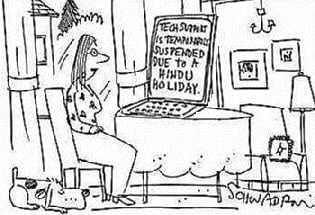
Indian Technical Support
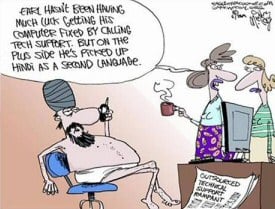
Earl hasn’t had much luck getting his computer fixed by calling tech support. But he has picked up Hindi as a second language.
P.S. Please send us your favourite Tech Support Joke – like these sent by readers:
- Programming today is a race between software engineers striving to build bigger and better idiot-proof programs, and the Universe trying to produce bigger and better idiots. So far, the Universe is winning. Rick Cook
- A co-worker was trying to get an obviously novice user to press the space bar. “Yes, press the space bar. The big key at the bottom of the keyboard.” After a pause the client replied “young man, there’s nothing on the BOTTOM of this keyboard!” Dean Chamberlain
Tech Support Problem – Hindu Holiday!
Tech Support Calls for DECT Phones
Hi,
My name is Shelley Hall.
I have been working at a callcentre in Belgium for over 6 years now so I have one or two stories to tell.
One of the products we are a Helpdesk for is Dect telephones.
I got a call from a woman who had bought one the day before.
“It doesn’t work” she told me.
“And you bought it yesterday?” I asked.
“Yes” she said.
“Did you put the batteries in?” I asked
“Yes, but it still doesn’t work.”
“And did you charge it?”
“Yes” she said, “overnight.”
“Is it plugged into the telephone line?” I asked.
“No.”
“Is it plugged into the mains, electrical socket?”
“No?”
“Why not?” I asked
“What for? It says wireless on the box. I don’t need wires!”
Hard to believe, I know but it’s true! This conversation really did take place.
Please send us your funny Tech Support story.


